
Pitch Speed Recorded in App!
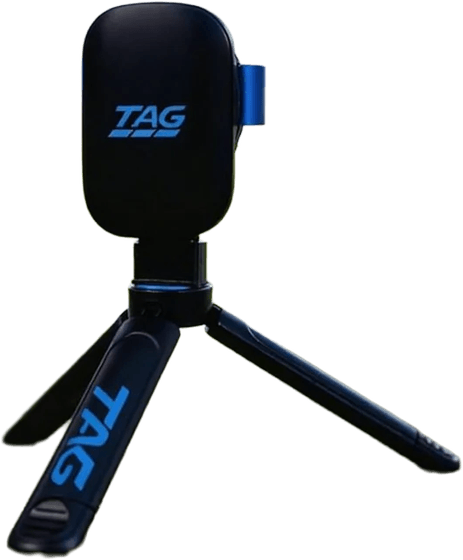
Every pitcher wants to track their speed progression, and now you can in one app! Pair a TAG One radar with Pitch Dynamics and every bullpen pitch is saved with its speed, the pitch you called, where it was actually caught, and whether it went down as a ball or a strike. Track progress throughout the season or off-season training. No more guessing!
The radar connects straight to the Pitch Dynamics app, giving you the speed data you're looking for. And unlike other radar devices, there is NO SUBSCRIPTION with the TAG One radar.
20% OFFon a TAG One radar with code PitchDynamics
Official Partner
TAG Sports
The TAG One is a Bluetooth radar from TAG Sports that measures ball speed for baseball and softball. Pitch Dynamics reads it directly, so the speed lands on the pitch you just called instead of on a separate screen you have to copy down later. Specs, pricing and ordering are on TAG's site.
Pitch Dynamics teams get 20% off a TAG One radar. Use this code at checkout:
PitchDynamicsHow It Works
Three steps, and only the first one is new.
Set the radar up
Behind the pitcher is the usual spot, and behind the catcher works too. The first time, the app finds your radar over Bluetooth and remembers it. After that it reconnects on its own when you open a practice.
Call the pitch the way you always do
In the Pitch Dynamics app, enable TAG Radar on the Team Dashboard, under Game Settings. Set up a practice session. Pick the pitch, location and hit Send It.
The speed is displayed and recorded
The speed appears in app. Tap where it was caught, Ball or Strike, then Record, and the speed saves with that pitch.
The radar talks to your phone, and nothing else
There is no TAG login to create for this integration, no second subscription, and no internet needed at the field for the radar to work. The connection is Bluetooth from the radar to your phone, the same way your players' watches already connect to you.
One radar, one phone, one bullpen. Set it up and forget it.
A Number Is Worth More With a Pitch Attached
Speed on its own is a bragging number. Speed recorded against the pitch you called, the spot you asked for and the spot it actually hit is a coaching number.
Change of speed, measured
See the real gap between the fastball and the change up, session by session, instead of estimating it from the catcher's reaction.
Speed next to command
Every reading sits with the spot you called and the spot the catcher caught. A pitch that gained three miles an hour and lost the corner is a trade you can actually see.
Velocity across a season
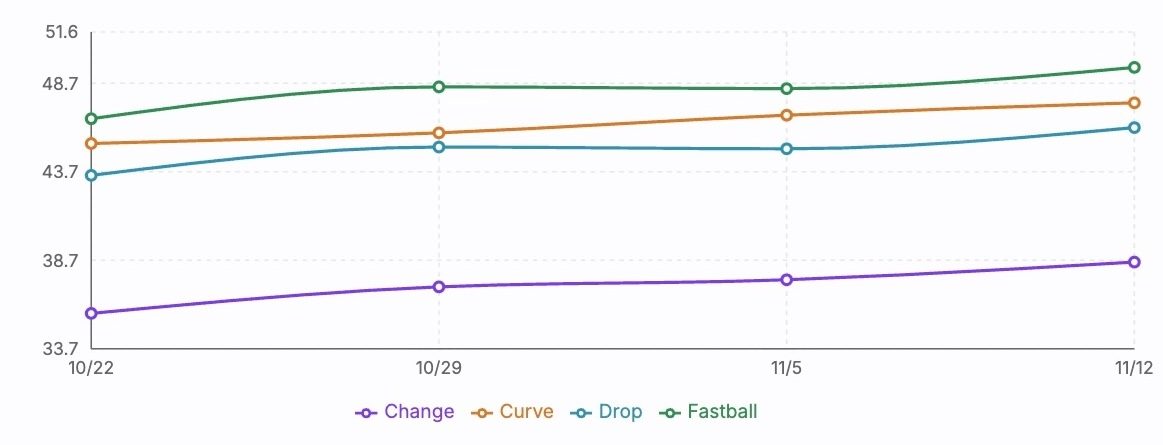
Each session rolls into a trend line per pitch type, viewable by average or by max, so a gain holds up over months rather than one good Tuesday.
A career top speed worth quoting
The fastest pitch a player has thrown with Pitch Dynamics, pulled from recorded pitches rather than somebody's memory of a showcase.

In the App, During the Bullpen
- The speed appears on the result card as you record the pitch, in the upper right corner.
- A new stat card is available called Velocity page along with your Strike %, Spot % and Received Spots
- The radar connection has its own status, so you know it is reading before the pitcher warms up
- In the Pitch Dynamics app, choose between positioning the TAG radar behind the pitcher or the catcher.
- The TAG radar displays its current battery life in app
In the Portal, After the Bullpen
Completed practices feed the Pitch Speed card on the Practices page of your dashboard.
- Top Speed: the fastest pitch on record for that player
- Change of Speed: the spread between their fastest and slowest pitch types
- Latest Average: where the most recent session landed
- Speed by Pitch: thrown, average, max, min and last, for every pitch in the repertoire
- Speed Over Time: a line per pitch type across sessions, switchable between average and max
- Practice Sessions: every pitch of a session in the order it was thrown, with its speed
What You Need
- A Pitch Analytics subscription, which is the tier that includes practice sessions
- A TAG One radar, bought from TAG Sports (20% Off with discount code PitchDynamics)
- An iPhone, iPad or Android phone with the Pitch Dynamics app
- Enable the toggle TAG Radar on the Team Dashboard, under Game Settings.
Frequently Asked Questions
Do I need a TAG account or a second subscription?
No. The radar connects straight to your phone over Bluetooth. There is no TAG login to create and nothing else to pay for beyond the radar itself.
Does it need internet at the field?
No. The radar and your phone talk to each other directly, so a bullpen in a barn with no signal works the same as one at the park.
Does pitch speed work in games?
Currently, pitch speed is recorded in practice and bullpen sessions only.
Does it work for softball as well as baseball?
Yes, both. Speeds are recorded the same way and shown against the same pitch types your team already uses.
Is the radar included with my subscription?
No. The TAG One is bought from TAG Sports. Pitch Dynamics is what reads it and keeps the data with the rest of your pitching stats.
What happens if the radar reads the throw back from the catcher?
You tell the app where the radar is set up, and it ignores balls travelling the other way. If a stray reading still lands on a pitch, Pitch Dynamics displays both speeds. Tap the correct speed to tag it to that pitch.
Which subscription tier includes this?
Pitch Analytics. Practice sessions and the stats built from them are part of that tier.